
The COVID-19 Release
We hope everyone is going ok in the face of our current global situation. Our time has been focused on spending a lot more time with our families 🏄, developing our products 🏋️ and trying to maintain our sanity 🤦. We suspect you are doing the same 😀. It is a crazy world now and we wish you the best 🙏.
This release has been bubbling along in pre-release for quite awhile now. There are a load of new features and performance enhancements. Please read through the notes and contact us if you have any questions.
MarkUp Updates:
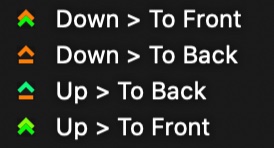 A new set of button actions have been introduced.
- Down > To Front - When button is pushed down, linked buttons are pushed to the frontmost layer possible.
- Up > To Front - When button is pushed up, linked buttons are pushed to the frontmost layer possible.
- Down > To Back - When button is pushed down, linked buttons are pushed to the backmost layer possible.
- Up > To Back - When button is pushed up, linked buttons are pushed to the backmost layer possible.
Last Up, Last Down, Next Up and Next Down features added to qualifier buttons. When selected, these features will insert the qualifier into the clip button that was last pushed up or last pushed down or the next pushed up.
These features are useful for marking qualifiers automatically in clips using button actions. The coolest aspect of these features is that they scan for private links first, so if a private link exists, the qualifier will be inserted into the last clip up or down or next clip up or down that is privately linked to that clip button.
Center Fire feature added to the MarkUp shortcut key.
 When this feature is selected for multiple buttons that have the same
shortcut key; the button that is closest to the center of the MarkUp
view will be fired. Using this option with Down > Center or
Up > Center button actions can improve the speed in which data capture
can be done. Buttons that have the same hotkey without this option selected
will still be fired off using the shortcut.
When this feature is selected for multiple buttons that have the same
shortcut key; the button that is closest to the center of the MarkUp
view will be fired. Using this option with Down > Center or
Up > Center button actions can improve the speed in which data capture
can be done. Buttons that have the same hotkey without this option selected
will still be fired off using the shortcut.
MarkUp button shortcut key indicator can be moved like the button name text by holding down Control Option then clicking on the text and dragging to desired position.
Private actions updated to add more control where qualifiers are inserted. If a clip button has a private link, only qualifiers that are privately linked will be inserted. Qualifiers not linked to the clip button will not be inserted into clips created by the clip button.
MarkUps open faster and are presented sharper.
Composer Updates:
Copy clips from Composer to Composer added to the right click clip menu in the composer. This works similar to copying from a timeline and includes specific topic choice. Also, clips can be copied to the same composer in a different topic.
Inline topic editing added to composer.
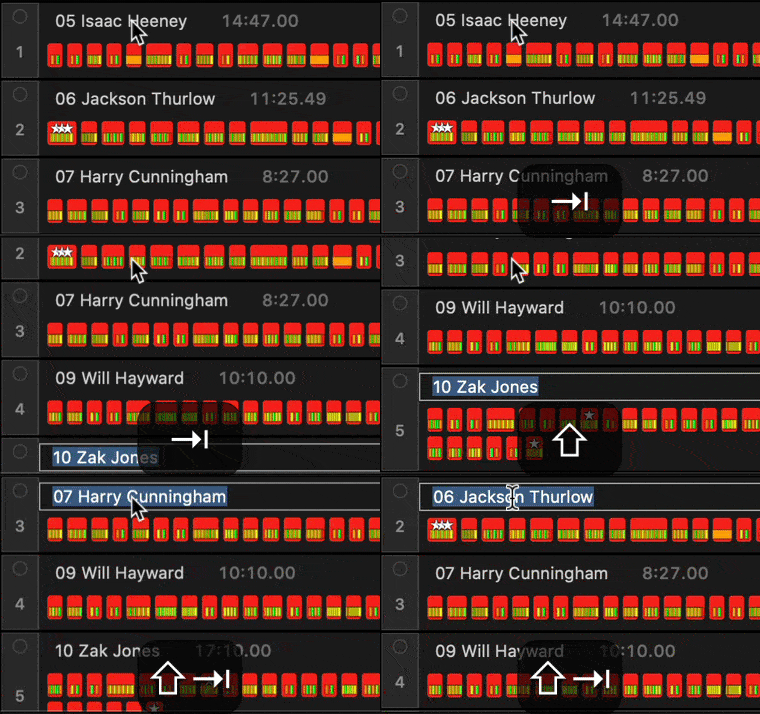 Click and hold on the topic, when the click is released, the topic text is selected
and can be edited. Pressing the Tab key will jump to the next topic down and pressing
Shift Tab will jump to topic above. Press Escape, Return or click away from the text
box to close the inline editor.
Click and hold on the topic, when the click is released, the topic text is selected
and can be edited. Pressing the Tab key will jump to the next topic down and pressing
Shift Tab will jump to topic above. Press Escape, Return or click away from the text
box to close the inline editor.
Remove Stars and Remove Notes for selected clips added to the right click clip menu in the Composer.
Exclude all topics in the Composer by holding down Option and clicking on the exclude button in the topic header. This is similar to showing and hiding all contents in a folder.
Composer clip linking added to the movie collection. There are times when you need to link a different movie collection to clips in a composer. This can be done by opening an alternate movie collection, then clicking and dragging from the link icon in the movie collection toolbar to clips in the composer. When dragging the link arrow over the clips in the composer, clips from a like collection will highlight in the composer. Once you let go, a message will appear explaining the new linking that will take place.
Linked movie collection details appears in inspector for a selected clip.
Clicking in the topic header selects all clips in the topic.
Updated topic dragging routines and all clips are displayed when topic is dragged up or down.
Clip selection made easier in the Composer. Multiple clips can be selected using Command, Command can be released, then Option held down and the clips can be moved. No more clicking on the last clip twice!
Topic rows will scroll when dragging a clip to the top or bottom edge of the composer.
Timeline Updates:
Copy clips to Composer Topic added to the right click clip menu in the timeline.
Remove Stars and Remove Notes for selected clips added to the right click clip menu in the Timeline.
JSON Timeline Export has been optimized and more export triggers have been added: when a note is inputted in a clip and when a clip is manually created in the timeline using Shift Control drag.
Timeline Description field added to inspector. Metadata such as weather, time, identifiers, etc. can be inserted here to describe the timeline. The data will be included in the native timeline files and JSON exports.
Added option to include the clip notes in the name of cut clips from the timeline. This option can be found in the Cut Clip Settings of the timeline.
When there are multiple note types, the notes will be concatenated into the file name.
NOTE: file name length limit is 255; with the file extension, there are 250 characters that can be included, so notes might be truncated.
Better timeline file saving.
Live touchbar button, Live button in timeline toolbar and Command J shortcut push the timeline playhead as close as possible when HLS movies are in the movie collection.
Improvements to HLS streaming loading and jumping to live edge of stream using Live button in touchbar and timeline toolbar and Command J shortcut.
Movie Collection Updates:
Localize All HLS Movies option added to right click menu on movie collection. This begins localizing procedure for all angles in the movie collection.
More improvements to the HLS movie creation and localizing routines. The right click menu has been re-arranged and includes an option to use local movies for all angles or use HLS movies for all angles.
Better copy and paste of HLS from Piston into Angles. All angles can be copied to the clipboard at once from Piston and pasted into Angles in one go.
Angle IDs are automatically created when HLS URLs are pasted into a movie collection.
Added movie ratio option Fit To Widest under the movie collection Arrange menu. This option helps support panoramic camera views.
General Updates:
A lot of refinements when loading, closing and saving files.
Popup menus have been re-written with new intuitive behaviours included; much easier to navigate without losing the path to the selection.
Optimised closing of Super Tabs. The routines involved in saving and closing of all the files in the Super Tab have been made more efficient.
The application clip menu shows all possible copy options with shortcuts.
BUG FIXES:
Join Timelines was creating a new collection and timeline, however it was not copying the data across to the new files. This works properly now.
Locked Play was allowing space bar and arrow keys to control the playhead while in MarkUp mode. These keyboard shortcuts are now disabled in locked play mode.
When a timeline is open while Angles is launched, the timeline was not being drawn correctly. This has been fixed.
Popup menus not properly responding to trackpad gestures.